
.svg)
How Businesses Can Connect SaaS Tools to Automate Everyday Workflows


Most businesses now run on a stack of cloud software: a CRM for sales, a help desk for support, accounting software for finance and a project board for everything in between. Software as a Service (SaaS) makes those tools easy to adopt. But owning more tools does not make a business more efficient.
When applications work in isolation, employees fill the gaps by hand. They copy details between systems, update records, chase notifications and repeat the same admin tasks. Connecting SaaS tools turns those separate applications into one coordinated system that supports everyday work.
Workflow automation means creating rules and connections that move information between applications and trigger actions when conditions are met. Take a new inquiry submitted through a website. Automation can create a contact in the CRM, notify a salesperson, generate a follow-up task and update a reporting dashboard. Connected applications handle those steps in the background, so no one has to do them by hand.
The best way in is to start small. Pick one workflow, measure its results and expand from there. Connect tools around real business needs, not because a feature happens to be available.
Why Connected Tools Improve Daily Operations
SaaS integration lets two or more cloud applications exchange information and coordinate actions. The connection might use application programming interfaces (APIs), native integrations, automation platforms or webhooks. Each application still does its own job, but data moves between them without anyone retyping it.
For example, an invoice created in an accounting platform can update a payment record in a CRM. A project management tool can receive a new task the moment a client approves a proposal.
The gains are biggest when work crosses departments. Sales can share customer details with account managers. Marketing can receive campaign data. Finance can see billing information without waiting for a manual update. Teams also work from more current information, which keeps records consistent.
One caution: integration is only as good as the planning behind it. A poorly designed workflow can spread inaccurate data faster than any manual process. Define your processes, organize your data and maintain your connections before you automate.

Start by Finding Repetitive Work
The most effective automation projects start with a clear picture of everyday work. Look at how employees complete routine tasks, where information originates and which steps repeat. Strong candidates include copying customer details, creating project records, sending standard notifications, updating spreadsheets, assigning support requests and preparing recurring reports.
Document the workflow from start to finish before you choose an integration platform. That makes it easier to tell which tasks need automation and which processes need redesigning first. Automating an inefficient procedure without fixing its underlying problems only creates new complications.
Ask these questions:
- Which tasks require employees to enter identical information into multiple applications?
- Where do requests wait for someone to forward a message or assign responsibility?
- Which activities follow predictable rules and produce consistent outcomes?
- Where do delays, missed notifications or incorrect records regularly occur?
- Which processes consume the most staff time relative to their business value?
The answers show where automation will pay off. Rather than automating every department at once, select one recurring process, record how it performs today and set a realistic improvement target. Starting small lowers implementation risk and builds the evidence you need for future investment.

Build Workflows Around Business Events
A reliable automation strategy focuses on business events, not isolated actions. An event is something meaningful that happens in a process: a customer submits a form, a payment arrives, a contract is signed or a support ticket is escalated. That event can trigger a sequence of connected actions across several applications. The result is a complete workflow instead of a single automated step that ignores what happens before and after it.
David Pickard, CEO of Phonexa, advises designing automation around a clear trigger and an intended outcome. When a lead enters a system, he explains, that one event can start data enrichment, lead routing, sales notifications and follow-up, with no one moving information between platforms. His point: define what needs to happen, and why, before you configure anything. Otherwise you risk building workflows that add activity without adding results.
Example 1: Online order processing
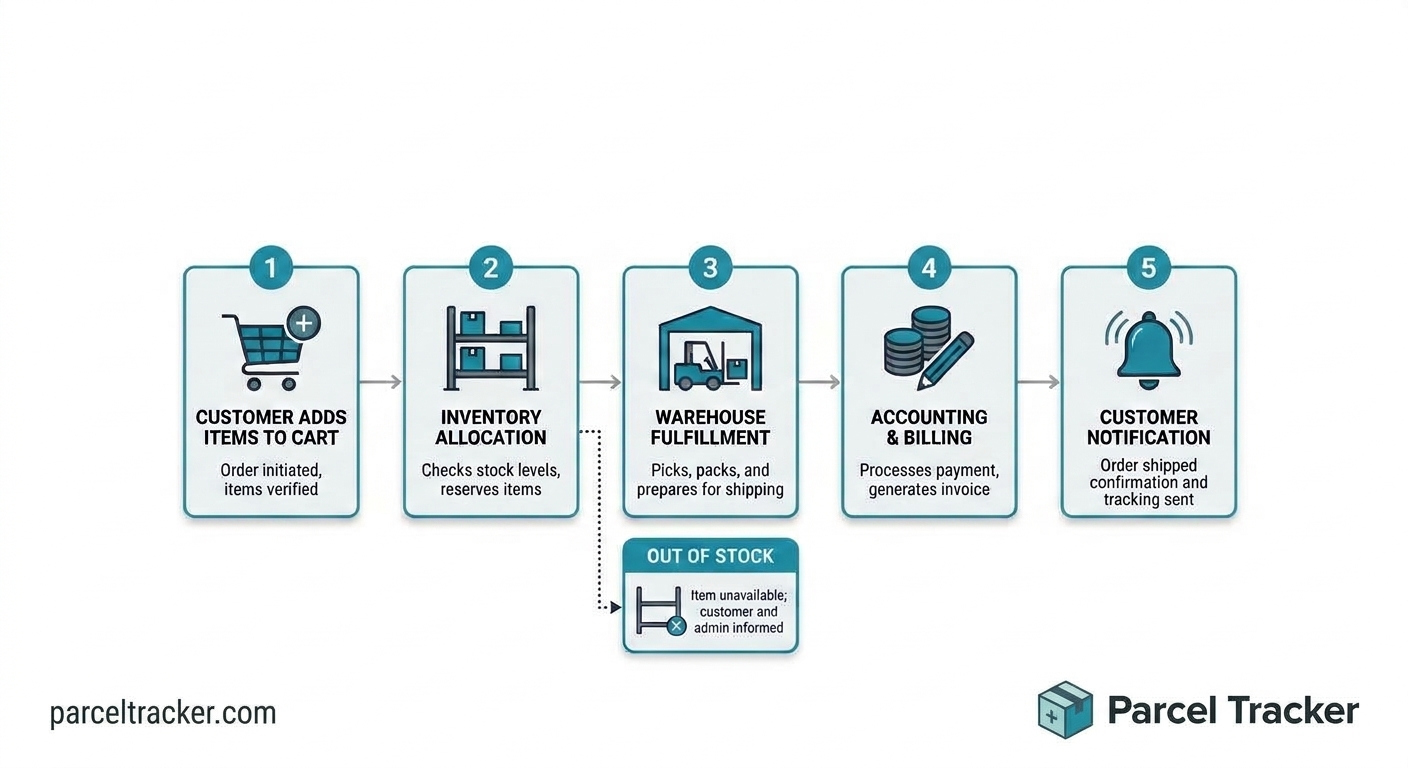
An online retailer could build an order workflow like this:
- A customer places an order on the ecommerce platform.
- The order details transfer to the inventory management system.
- The warehouse receives a fulfillment request.
- The accounting application records the transaction.
- The customer receives an order confirmation and delivery updates.
Each step depends on a defined event or condition. If inventory is unavailable, the workflow can take an alternative route instead of proceeding as though the order were ready to ship. Planning these branches in advance lets you build automation that reflects real operations, not an assumption that every transaction follows the same path.
Example 2: A parcel arrives at the front desk
The same event-driven logic works inside the office. Think about what happens when a package reaches reception:
- A courier drops a package at the front desk.
- Reception scans the label with a phone camera.
- The recipient gets an email, SMS or Slack alert with a QR code.
- The recipient shows the QR code to collect the package, which records proof of collection.
- If the package sits uncollected, automatic reminders go out.
In many offices, that process still means a handwritten log, a group email and a shelf of unclaimed boxes. Mailroom management tools like Parcel Tracker connect those steps, so staff spend less time chasing packages and recipients know the moment theirs arrives.

Choose the Right Integration Method
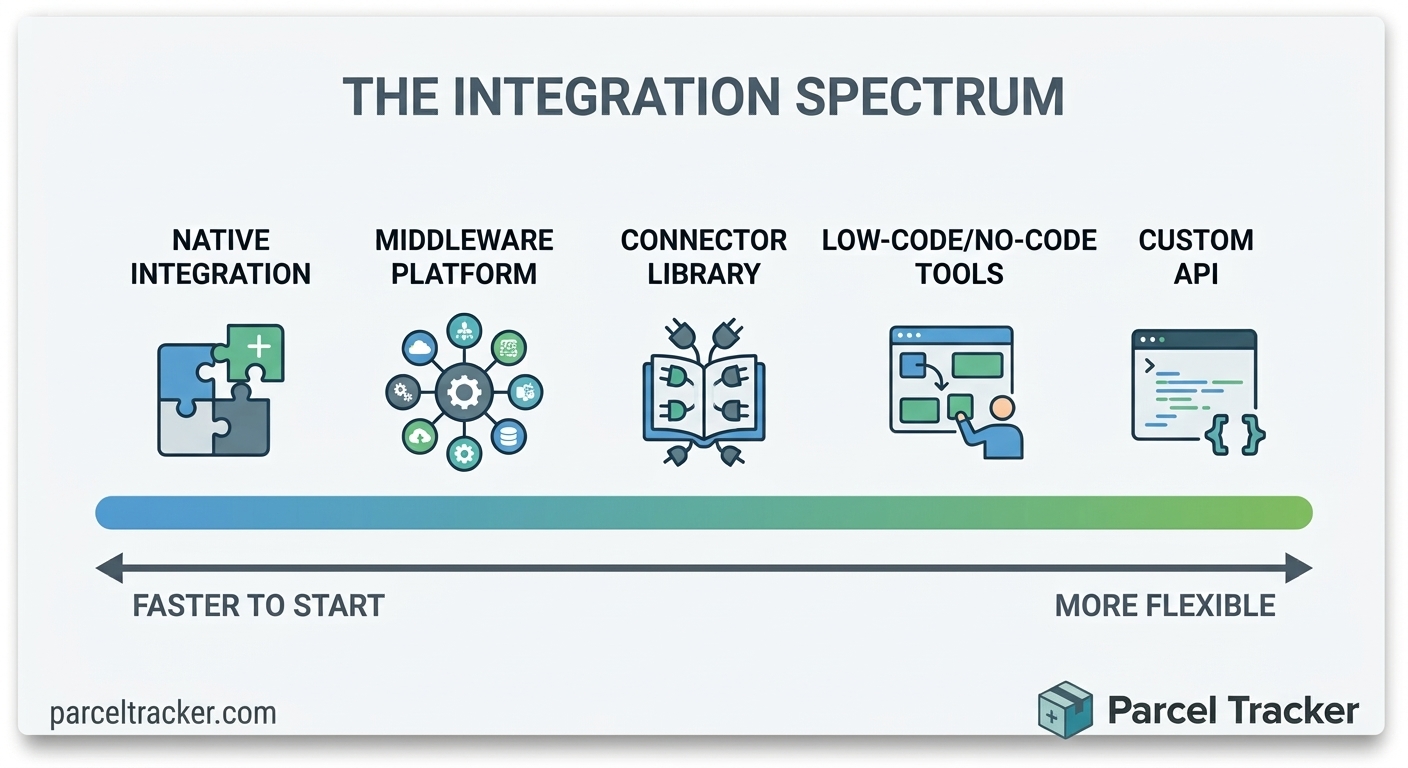
The right method depends on the complexity of the workflow, your technical resources, security requirements and budget. Many applications include native integrations you can switch on in settings. These are often the simplest starting point, because the software provider has already built and maintains the connection.
When native options fall short, you can use an automation platform or a custom API connection. Balance flexibility against long-term maintenance. A connection that is easy to set up but hard to troubleshoot can become expensive as the business grows.
Common approaches include:
- Native integrations: Built-in connections between applications for common data-sharing tasks.
- No-code automation platforms: Visual tools that link applications through triggers, actions, filters and conditional steps.
- Low-code workflow builders: Platforms that combine visual configuration with scripts or custom logic for more advanced processes.
- APIs: Interfaces that let software systems exchange information through defined requests and responses.
- Webhooks: Event-driven messages that tell another system something important happened, so workflows can start without constantly checking for changes.
Small businesses can often begin with native integrations or no-code platforms. Larger organizations may need custom development, stronger monitoring and tighter access controls. Whichever route you take, confirm that the applications support the data fields, permissions and transaction volumes you need before you commit to a design.
Automate Lead Management and Sales Follow-Ups
Sales workflows often span website forms, a CRM, email, scheduling tools and reporting dashboards. When those systems stay disconnected, reps copy contact details by hand, check whether a lead has an owner, set their own reminders and update each opportunity manually. That slows response times and risks losing valuable prospects.
A connected workflow can start the moment someone submits a contact form, downloads a resource or requests a demo. The system can create or update the contact record, identify the sales territory, assign an owner and notify the rep. It can also schedule a follow-up task or send an approved confirmation email. If the lead then books a meeting, the scheduling tool updates the CRM and gives the salesperson the context they need.
Set clear rules for lead qualification and assignment. Company size, industry, location, product interest and urgency can all decide which representative gets a lead. Automated scoring helps organize prospects, but it is not an infallible read of purchasing intent. Sales managers should be able to review unusual cases, correct misclassifications and override automated decisions when experience or judgment calls for it.
.jpeg)
Streamline Marketing Campaigns Through SaaS Integration
Marketing teams often juggle separate platforms for email campaigns, social scheduling, customer analytics, advertising, landing pages and CRM management. Without integration, they export spreadsheets, import contact lists, compare campaign results by hand and update customer segments in several places. That is time not spent on better content, customer research and campaign performance.
Connected tools let information follow the customer journey. When a visitor submits a form, the system can record the contact in the CRM, add the person to the right email sequence and alert a salesperson if the inquiry meets set criteria. When a customer unsubscribes, every relevant system should update their communication preferences to help prevent unwanted messages. Campaign results can also flow to reporting tools, so marketers can compare engagement, conversions and lead quality.
Good marketing automation depends on meaningful segmentation and responsible data management. Do not send identical messages to every contact just because the software makes mass communication easy. Reflect each person's preferences, consent, interests and lifecycle stage. Review automated sequences regularly, retire outdated messages and confirm that campaign changes show up in every connected application. The result is a more consistent customer experience with less manual administration.
Improve Customer Support With Automated Information Transfers
Customer support depends on accurate information and timely communication. A request may start in an email inbox, move into a help desk platform, need input from a technical specialist and end with an account update in a CRM. When those systems do not communicate, employees copy the same complaint into several records, explain the issue repeatedly or contact another department just to get information that already exists elsewhere.
Eugene Kashuk, Founder and CEO of Brighterly, an online platform offering 1:1 math and reading tutoring for K–12 students, points to information movement as a useful way to spot automation opportunities. He describes support agents who must transfer a parent's request from one system to another before the right person can respond. Connecting the systems moves that information automatically, leaving the human expert free to focus on resolving the underlying issue. Kashuk also recommends starting with frequent handoffs: automating a small task performed dozens of times a day can deliver more value than automating a complex activity that happens only occasionally.
A connected support workflow might run like this:
- A customer submits a request through the support portal.
- The help desk creates a ticket and checks for an existing customer record.
- The system categorizes the request using predefined rules.
- The ticket goes to the right team based on topic, urgency or account type.
- Customer history and order details appear for the assigned agent.
- The customer receives an acknowledgment, and managers can monitor unresolved or overdue cases.
Automation should not replace people when a situation calls for empathy, investigation or judgment. Complaints involving sensitive information, unusual circumstances or repeated service failures may need immediate escalation. The goal is to remove unnecessary information transfers so support professionals can give thoughtful, informed help.

Connect Project Management Tools With Communication Platforms
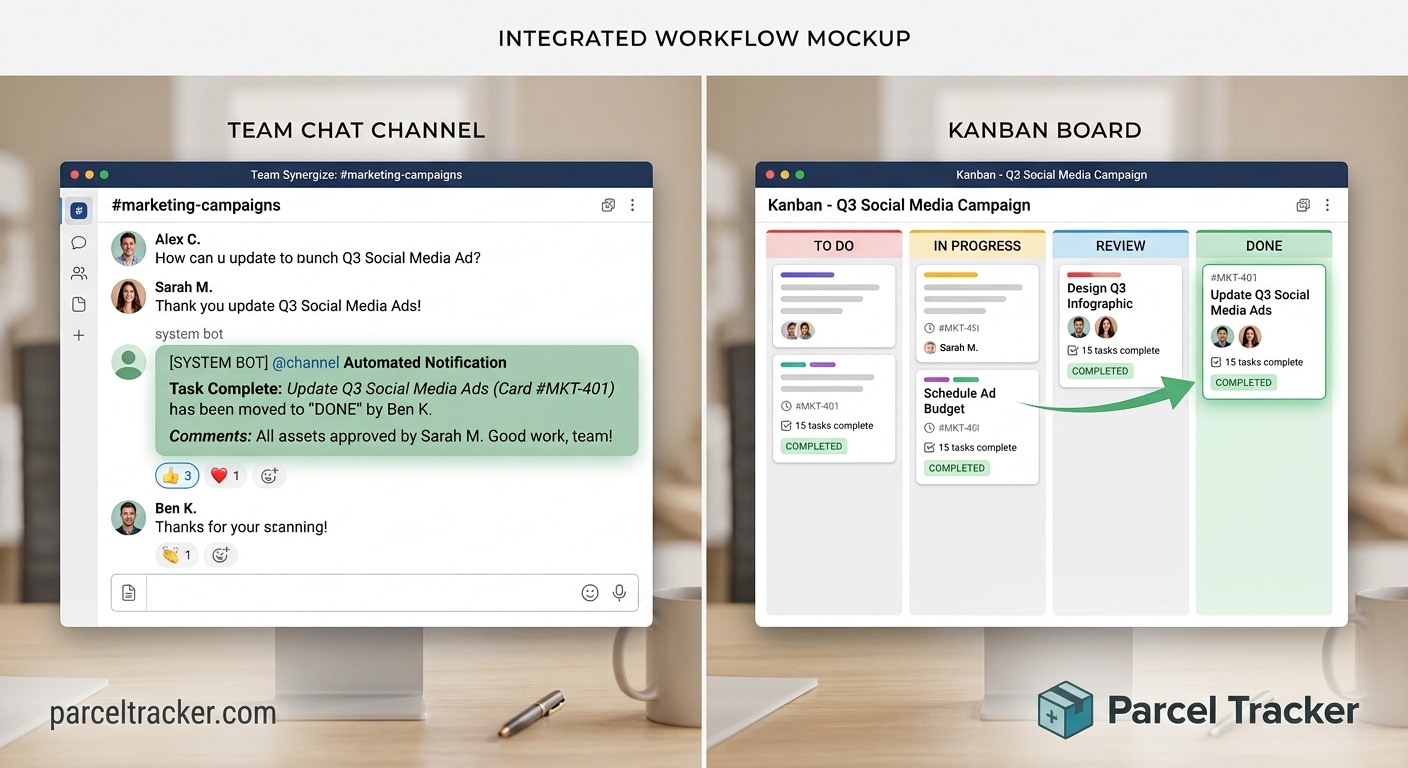
Project management applications organize tasks, deadlines, assignments, dependencies and deliverables. Messaging tools and email are where people coordinate the work. When the two are disconnected, important updates get buried in conversations and project boards go stale. Team members then spend time asking for status updates instead of doing their work.
Integrating the two ties discussion to real project activity. A task assigned on a board can post to the team channel. A changed deadline can alert the responsible employee. A completed task can notify the next person in line or start the next stage of the project. Ownership and progress become more visible without anyone duplicating updates manually.
Avoid notification overload, because too many alerts become another distraction. Reserve them for meaningful events such as blocked tasks, approaching deadlines, approvals and completed dependencies. Agree on which platform is the source of truth for task status. Messaging apps can host the discussion, but the project management system should remain the reliable record of assignments, deadlines and completion.
Automate Accounting and Financial Administration
Finance teams handle invoice processing, expense approvals, payment reminders, reconciliation and reporting. These tasks pull information from sales systems, ecommerce platforms, procurement tools, banks and accounting applications. Collecting and reconciling data from every source by hand is slow and makes records more likely to conflict.
SaaS integrations can transfer transaction details, create draft invoices, route expenses for approval and notify staff about overdue payments. Once a customer order is confirmed, for example, the ecommerce platform can send the details to the accounting application. When payment arrives, the system can update the invoice status and notify the account manager. A recurring expense can route to the right approver based on predefined spending limits.
Financial automation needs particularly careful controls, because errors can affect reporting, cash flow and compliance. Separate preparing a transaction from authorizing it. Routine data transfers can run automatically, while payments above a set threshold, unusual refunds and sensitive adjustments should require approval. Keep clear audit trails, limit access according to job responsibilities and periodically compare automated records against reliable source documents. Automation should improve financial visibility without weakening accountability.

Keep Data Consistent Across Applications
Connected applications are only as reliable as the information they exchange. One customer can appear under different names in the CRM, billing platform and support system. Product identifiers can differ between inventory and ecommerce tools, and employees may use different date formats or status labels. Left unresolved, these differences create duplicate records, inaccurate reports and confusing customer histories.
Set data standards before you expand automation. Agree on a format for each important category of information and decide which application holds the authoritative record. The CRM might manage customer relationship details, for instance, while the accounting system controls invoice balances and payment status. Other applications receive relevant updates without becoming competing sources of truth.
Practical data-management measures include:
- Standardizing names, identifiers, date formats and status values.
- Defining rules for identifying and merging duplicate records.
- Deciding which application owns each important data field.
- Validating required information before it enters downstream systems.
- Recording changes so teams can investigate unexpected updates.
- Reviewing data quality regularly and correcting recurring problems.
Also decide how integrations handle conflicting updates. If two applications modify the same record, the workflow needs a predictable rule for which value to keep, or for when a person should review it. Clear rules stop small inconsistencies from spreading across systems and affecting more complex processes.
Keep Human Judgment at the Center of Automation
Automation works best when it removes repetitive work but leaves decisions that need experience, context and accountability to people. A system can identify patterns, apply predefined rules, summarize information and recommend a next step. A recommendation is not always the right decision. Real processes involve exceptions, competing priorities and customer sensitivities that a simple rule cannot capture.
David Pickard of Phonexa draws the line at the point where automation should stop and human judgment should begin. A system might flag a lead as high priority, he notes, but a manager may still need to review the surrounding context before deciding how to proceed. The lesson: faster processing is not the same as better decision-making. The goal is to eliminate repetitive handoffs without removing decisions that genuinely require expertise.
You can put this principle into practice by designing escalation paths for unusual cases. Low-risk, predictable tasks can proceed automatically, while exceptions go to a designated employee for review. Define which actions require approval, who can override a workflow and how significant manual interventions are recorded. Reviewing those exceptions regularly can also reveal how to improve the underlying process, without trying to automate every possible decision.

Measure the Business Value of SaaS Automation
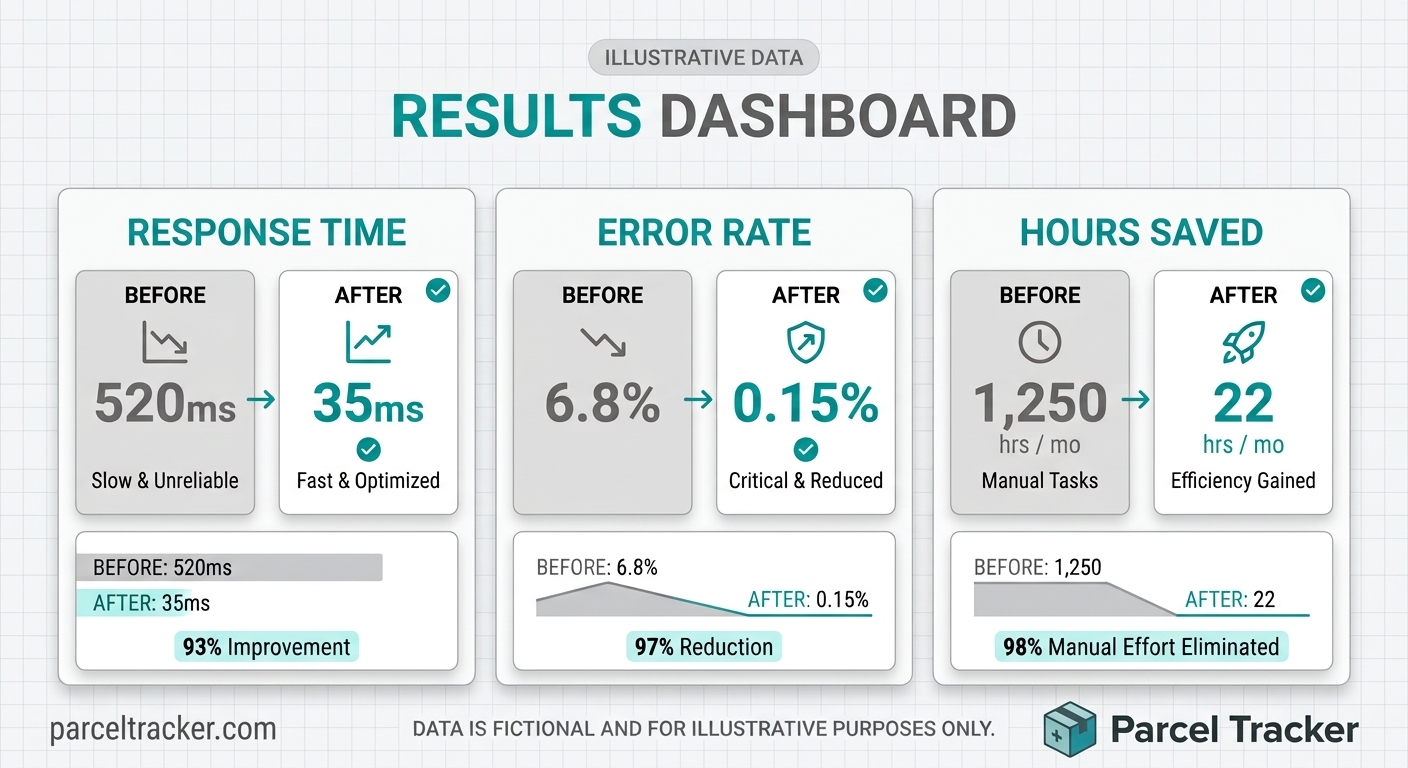
Judge automation projects by measurable outcomes, not by the number of integrations created. A workflow can move data between five applications without saving meaningful time or improving customer service. Baseline measurements taken before implementation show whether a connection delivered practical value and whether further investment is justified.
The right metrics depend on the workflow. A sales team may measure response time and lead assignment accuracy. Customer support may track ticket resolution time and transfers between teams. Finance may examine invoice processing time, reconciliation exceptions and overdue payments. Also weigh reliability, employee satisfaction, customer experience and the cost of maintaining each integration.
A practical measurement framework includes:
- Time saved: The reduction in minutes or hours spent on repetitive activities.
- Processing speed: The time between a triggering event and completion of the required action.
- Error rate: The frequency of duplicate records, incorrect transfers or failed updates.
- Workflow reliability: The percentage of executions that finish successfully without intervention.
- Operational cost: The combined cost of software subscriptions, development, monitoring and maintenance.
- Business outcomes: Changes in conversion rates, customer satisfaction, payment collection or other relevant results.
Compare these metrics against your original baseline and review them at regular intervals. An integration that saves time but creates frequent exceptions may be worth less than it appears. Tracking both efficiency and reliability helps you find weak points, set priorities and avoid expanding workflows that have not yet proven dependable.
Build Reliable Workflows With Testing and Error Handling
Even carefully designed integrations can fail. An application may become unavailable, credentials may expire, an API may change or a required field may be missing. Some failures clear with a retry, while others need human intervention. Without error handling, a workflow can stop silently, leaving employees unaware that an order, customer request or financial update never reached its destination.
Test integrations with realistic scenarios before making them part of daily operations. Cover normal transactions, incomplete information, duplicate events, unusual values, temporary outages and permission restrictions. Verify that the workflow produces the expected result and that errors are visible to the people responsible for fixing them. For important processes, keep a manual fallback so employees can keep working if a connection goes down.
Reliable workflows commonly include these protective measures:
- Automatic retries for temporary failures, with sensible limits.
- Alerts when a critical workflow fails or repeatedly hits errors.
- Logs that show when an event occurred and which actions followed.
- Duplicate prevention, so the same order or record is not created twice.
- A review queue for incomplete or conflicting information.
- A documented recovery process for restoring missed updates.
Design integrations to handle repeated events safely. If a system receives the same payment notification twice, for example, it should not record two payments. Regular monitoring, controlled testing and clear ownership keep automation dependable as applications and business requirements evolve.
Protect Business Data and Manage Access Permissions
Connecting applications multiplies the places business information can travel. That can improve efficiency, but it also raises security stakes. An integration may touch customer details, financial records, employee information or confidential documents. If its permissions are broader than necessary, a compromised account or misconfigured workflow could expose data well beyond its intended audience.
Evaluate the security practices of each platform and integration provider before sharing sensitive information. Limit access to the data and actions a specific workflow needs. Where supported, use dedicated integration accounts, secure authentication, encrypted connections and centralized credential management. Employees should never share passwords or embed sensitive access tokens in unsecured documents or scripts.
Set clear policies on what information can be transferred and how long it is kept. Review privacy obligations, contractual commitments and industry requirements before automating workflows that involve personal or regulated data. Revisit access permissions when employees change roles or leave, and rotate integration credentials when appropriate. These safeguards keep convenience from coming at the expense of confidentiality and control.

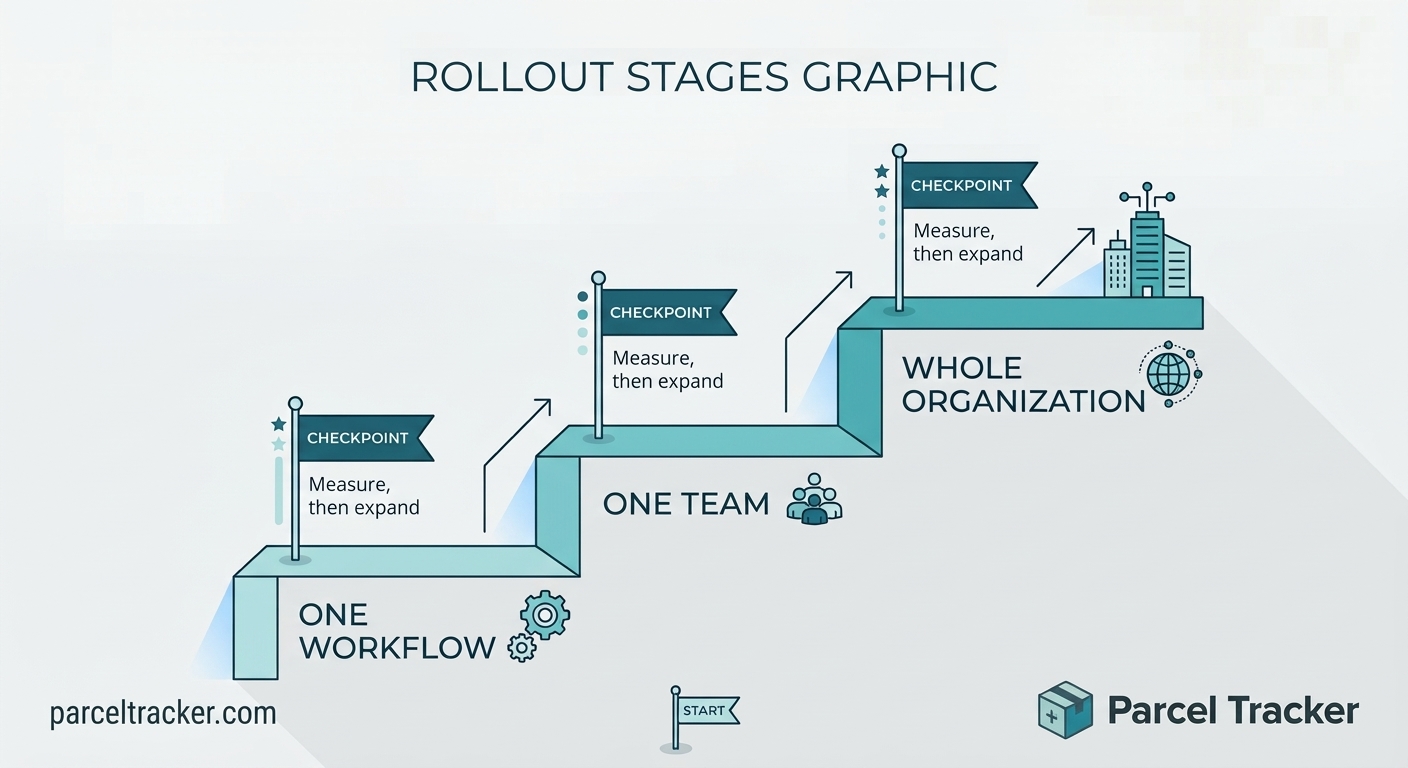
Scale Automation Gradually Across the Organization
Once a first workflow delivers consistent results, you can expand automation to other processes. Do not connect every available application at once. Each additional workflow adds dependencies, maintenance work and potential failure points. A gradual approach lets teams learn from real performance, improve standards and build confidence before taking on more complicated connections.
Eugene Kashuk of Brighterly recommends prioritizing the handoffs that happen most often. His example: a ten-minute task performed thirty times a day adds up to five hours of staff time daily. Frequency can matter more than technical complexity, since a small improvement repeated all day may save far more than a sophisticated automation used a few times a month. Kashuk also advises measuring the time saved and expanding only after the first workflow is fully reliable.
A staged rollout might look like this:
- Select a high-frequency, low-risk workflow with a clear business purpose.
- Document the current process and measure its performance.
- Choose compatible applications and define the expected data flow.
- Build and test the integration with realistic scenarios.
- Introduce the workflow to a limited group of employees.
- Monitor errors, time savings and user feedback.
- Document the final process before extending it to other teams.
This approach encourages controlled growth and helps you avoid unnecessary complexity. Assign responsibility for maintaining each integration, reviewing software changes and responding to failures. As connected applications multiply, documentation and ownership matter as much as the initial setup.
Overcome Common Challenges in SaaS Integration
Even well-planned projects hit obstacles, and not all of them are technical. Jessica Shee of iBoysoft outlines both kinds:
“Businesses may encounter several obstacles when connecting SaaS applications. Different platforms may use incompatible data structures, restrict access to certain features, or impose limits on the number of API requests. Some applications may not provide the events or fields needed to support the desired workflow. Subscription costs can also rise when advanced integration features or additional usage allowances are required.
“Organizational challenges can be equally important. Employees may resist a new process if they do not understand its purpose or fear that automation will make their work more difficult. Departments may disagree about which system should control shared information, while unclear ownership can leave broken workflows unresolved. Addressing these issues requires communication, training, and coordination alongside the technical implementation.”
— Jessica Shee, Senior Tech Editor, iBoysoft
You can reduce these challenges with a few practical steps:
- Confirm application compatibility and integration limits before implementation.
- Review total costs, including subscriptions, development and maintenance.
- Standardize information before connecting systems with conflicting formats.
- Explain how automation will reduce repetitive work and improve outcomes.
- Train employees to recognize failures and follow escalation procedures.
- Document ownership, permissions and troubleshooting responsibilities.
- Review integrations periodically as software and business needs change.
If an integration becomes too complicated to maintain, simplify the process instead of adding another layer of automation. Reliable connections are understandable, observable and aligned with how the business actually operates. A smaller set of dependable workflows often delivers more lasting value than a large collection of fragile automations.
Start Small and Build an Automation Strategy That Lasts
Connecting SaaS tools lets businesses automate everyday workflows, cut repetitive administrative work, improve information accuracy and coordinate activity across departments. When applications are linked around meaningful business events, customer details, transaction records, project updates and support requests reach the right place without constant manual transfers.
The most successful approach comes down to a few habits:
- Start with one specific operational problem and prioritize frequent handoffs.
- Define clear triggers, outcomes and owners.
- Choose integration methods that match your technical capabilities.
- Keep data consistent and protected, and preserve human judgment where decisions need context or experience.
- Test thoroughly, monitor failures and measure results against a baseline.
Start small and expand only after an integration proves reliable. That is how businesses build an automation strategy that saves time, supports employees and adapts as operational needs grow.

Ready to automate the front desk? Package deliveries are one of the easiest workflows to connect: scan on arrival, notify the recipient automatically and capture proof of collection with a QR code. Try Parcel Tracker for free and see how it fits your office.


.svg)

