What is Emergency Notification Scripting in the Mailroom?


In high-volume corporate, residential, or logistics facilities, the mailroom is a critical location that handles thousands of touchpoints daily. It is also the first point of entry for potential hazards. Emergency notification scripting refers to preconfigured, automated communication protocols that trigger instant, standardized alerts during facility disruptions.
When a crisis occurs, the human element can often lead to panic or delayed communication. By using scripts, mailroom managers can ensure that life-saving or security-critical instructions are delivered without the dangerous delays of manual drafting.
5 Key Components of an Effective Script

A script is only as good as its clarity. To ensure your mailroom remains resilient, every script should be built with these five pillars:
- Concise Directives: Use clear, jargon-free action instructions.
- Example: Instead of "Please be advised there is an issue," use "LOCKDOWN: Secure all entry points. Await further instructions."
- Segmented Contact Lists: Not every emergency requires a building-wide evacuation. Effective scripting allows you to target specific zones or departments to avoid unnecessary business interruption.
- Omnichannel Delivery: People digest information differently. A robust script should deploy simultaneously via SMS (for speed), Email (for detail), and Push notifications (for visibility).
- Standardized Templates: These are pre-filled forms where a manager only needs to select the "Hazard Type" and "Location" from a dropdown, minimizing manual entry errors under pressure.
- Time-Stamping & Audit Trails: Every alert should be automatically logged. This is essential for post-incident compliance reviews and insurance reporting.
4 Common Use Cases: Scripting in Action
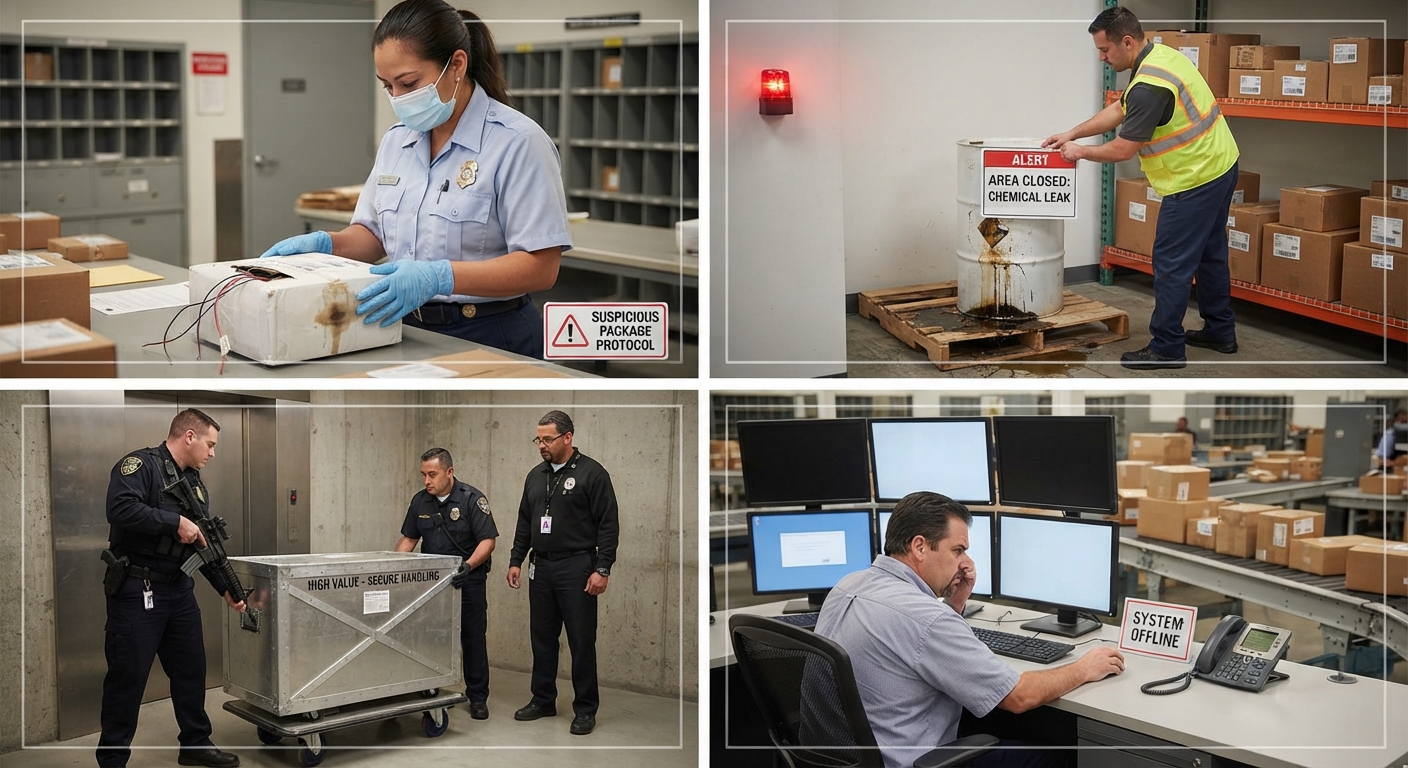
When should these scripts be deployed? Here are four scenarios where automated scripting saves time and lives:
- Suspicious Packages: If an operator identifies an oily stain, wires, or an unexpected parcel from a high-risk origin, a "Suspicious Package" script can instantly notify security and provide the operator with immediate isolation steps.
- Facility Hazards: In the event of a chemical leak from a damaged parcel or a localized fire, a script can trigger an immediate "Area Clearance" alert to nearby staff while notifying the maintenance team.
- High-Value Assets: For banks or legal firms, the arrival of sensitive documents or bullion requires a specific chain-of-custody script. This notifies the recipient and security team simultaneously, ensuring the asset never sits unattended.
- System Downtime: If the mailroom management hardware or local internet goes down, a "Service Delay" script can be sent to all tenants to manage expectations and prevent a bottleneck of inquiries.
5 Best Practices for Implementation

Establishing a robust communication framework requires a blend of technical precision and consistent operational oversight.
- Regular Script Audits: Personnel and tenant rosters change rapidly. Conduct quarterly reviews to ensure your contact data and escalation hierarchies are up to date.
- Multichannel Redundancy: Infrastructure can fail during a crisis. Ensure your scripts are prepared for secondary channels. If the Wi-Fi is down, your system should automatically pivot to cellular SMS.
- Role-Based Access: To prevent doubts and confusion, restrict the ability to trigger high-level emergency alerts to authorized personnel only.
- Simulation & "Ghost" Drills: Don't wait for a real fire to test your script. Run monthly drills to verify that staff understand the automated instructions and that automated parcel notifications reach everyone within 30 seconds.
- Post-Incident Analytics: After every alert, review the data. Did everyone open the message? Was the language clear? Use these logs to refine your wording for the next version.
Securing the Future of Your Mailroom Operations

Implementing a proactive parcel management strategy is essential for modern facility safety. By having structured, automated scripts, you ensure that when seconds count, your communication is flawless.
Ready to secure your operations? Explore the best mailroom software options or streamline your safety protocols today with Parcel Tracker.
Expert FAQ
What is emergency notification scripting in a mailroom?
It is automated, pre-written communication protocols used to broadcast instant safety alerts during mailroom disruptions and security incidents.
Why is mailroom notification scripting important for facility safety?
Scripts reduce human error and panic, ensuring rapid, clear, and standardized instructions are sent to all stakeholders during emergencies.
How does automated parcel notification improve mailroom security?
Automation enables real-time tracking and instant alerts, reducing the time suspicious or high-value packages spend unattended in the facility.
What are the essential components of a mailroom emergency script?
Effective scripts require concise directives, omnichannel delivery, segmented contact lists, standardized templates, and automated time-stamping for compliance.
How often should you audit mailroom emergency scripts?
Perform audits quarterly to maintain accurate contact data, update security protocols, and ensure compatibility with current mailroom management software.