
.svg)

Warehouse Management Software That Actually Saves Time
.svg)
.svg)
.svg)
.svg)
.svg)
.svg)
.svg)
.svg)
.svg)
.svg)
.svg)
.svg)
.svg)
.svg)
.svg)
.svg)
.svg)
How Parcel Tracker Warehouse Management Software works
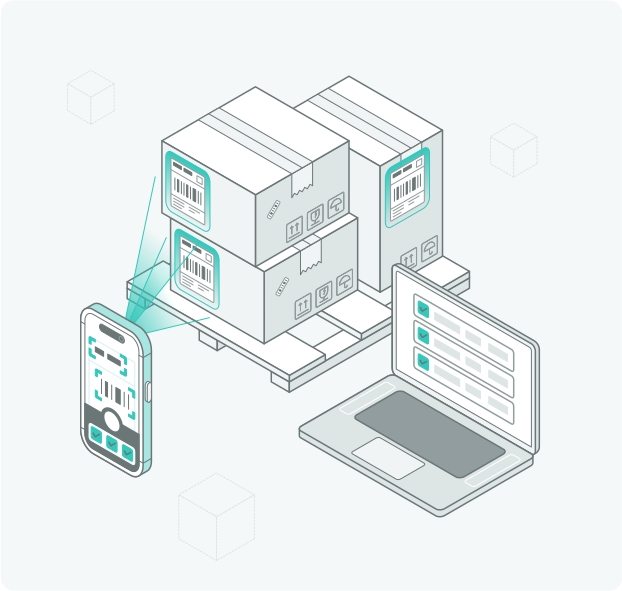


Simplify Warehouse Management

Optimize Warehouse Parcel Handling

Automate Notifications for Smooth Operations

Enhance Security with Proof of collection

Gain Actionable Insights for Warehouse Efficiency
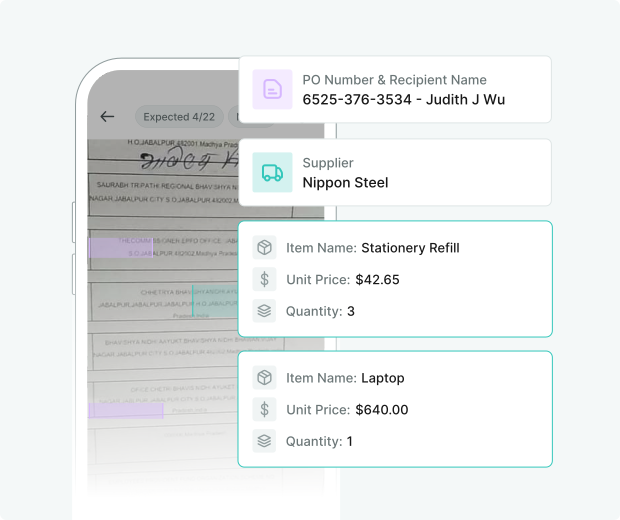
Automate PO Detection and Reconciliation

Optimize Internal Parcel Movement with Multi-Hop Routing
Try Parcel Tracker for Free
Customer Success Stories




.svg)
.svg)
.svg)
.svg)
.svg)
Test Parcel Tracker’s AI Now
Upload you parcel label, purchase order, advice/delivery slip and witness how Parcel Tracker extracts all the required data in a few seconds.
Used in wide spread of industries

.svg)


Explore Parcel Tracker’s full functionality
.svg)


.svg)
Scale With Security in Mind


.png)
Parcel tracker Time
Saving calculator
Frequently asked questions
.svg)
Warehouse management software (WMS) is a digital system that helps businesses receive, track, and manage parcels and shipments across one or more warehouse locations. New to warehouse management? Read our full guide.
Yes, Parcel Tracker supports inter-warehouse parcel tracking, ensuring every package transfer between facilities or departments is logged and monitored until final delivery.
Each parcel scanned into the system is tracked at every checkpoint, recording its location, timestamp, and the handler, providing full visibility of its movement.
Yes, Parcel Tracker lets you create custom warehouse zones and record exactly where each parcel is stored.
Every transfer is logged with a digital signature, timestamp, and photo. You get a secure, tamper-proof digital audit trail for all intra-warehouse movements.
Parcel Tracker is built around the full inbound and outbound parcel workflow. Warehouse staff scans incoming parcels at receiving, and the system logs dispatches with a complete end-to-end record.
Parcel Tracker automatically extracts PO numbers from incoming parcel labels using AI-powered OCR and matches them against expected deliveries.
Yes. Connect Parcel Tracker to your existing workflows via our open API. Whether parcels move internally or externally, your systems stay in sync.
Yes. Parcel Tracker offers a 14-day free trial of the Pro Plan. After the trial, you can continue using Parcel Tracker for free, managing up to 100 parcels per month at no cost, forever.
Parcel Tracker provides real-time reporting on parcel volumes, transfer times, handling efficiency, SLA compliance, and pending shipments. These insights help warehouse managers identify bottlenecks, optimize workflows, and improve overall operational performance.
Absolutely. The system features a simple and intuitive interface, requiring minimal training, making it easy for warehouse teams to log, track, and manage parcels. Most teams are up and running in under an hour.
Yes. Parcel Tracker lets you customize notifications with your company branding, logo, and tailored messaging, ensuring a consistent and professional communication experience for every recipient.
The system captures proof-of-receipt through digital signatures, timestamped images, and a secure audit trail, ensuring clear accountability for all parcel movements.
Parcel Tracker is purpose-built for incoming parcel tracking and last-mile internal delivery, making it faster to deploy, easier for warehouse staff to use. Meanwhile, traditional warehouse management systems are built around bulk inventory control, stock levels, and ERP integration, typically requiring significant setup time and IT resources.
If label information is incomplete or incorrect, Parcel Tracker allows for manual entry, with advanced search and tagging features to correctly assign parcels to the right recipient or department.
Yes. Parcel Tracker's AI-powered OCR reads recipient details directly from the label and generates a barcode for the parcel automatically.
Mailroom App:
- iPhones: SE (3rd Gen) or 12+ for optimal performance.
- Android Phones: Pixel 6A or higher (6GB RAM, 2.8 GHz recommended).
- Tablets: Not ideal due to size, but OnePlus Pad is a suitable option if required.
Kiosk App:
- iPhones: Minimum: iPhone 8 or SE (2nd Gen). Recommended: SE (3rd Gen) or 12-14.
- Android Phones: Pixel 6A or devices with 4GB+ RAM.
- Tablets: Any iPad from the last five years (iPadOS 11+) or newer Android tablets with 3GB+ RAM.
Start using parcel tracker
For free
Explore Parcel Tracker’s full functionality
Used in wide spread of industries
